
How to pay electric bills online?
Online electricity bill payment has become the default way most Indian households settle their power bills, and for good reason. You skip the queue at the electricity board office, you get an instant payment confirmation, and you can do it from a phone at 11 pm if you want to. We put together this guide to walk through every major way to pay your electricity bill online, plus what to do if a payment doesn’t go through the first time.
Ways to Make Online Electricity Bill Payment in India
Most electricity boards route their electricity bill payment through the Bharat Bill Payment System, or BBPS, which the RBI set up specifically to standardize bill payments across banks and apps. A few electricity boards aren’t on BBPS yet, so it’s worth checking your provider before assuming every app supports it.
Beyond BBPS, here are a few other reliable routes where you can make your online electricity bill payment:
- UPI apps like Google Pay, PhonePe, and Paytm, which usually show a dedicated “electricity bill” or “recharge & pay bills” section
- Net banking, directly through your bank’s website or app
- Electricity board portals, where you pay directly on your provider’s own site (BESCOM, TPDDL, Adani Electricity, and similar)
- Paytm’s wallet, which some apartment complexes also accept for society maintenance payments if that’s how your building handles billing
Paying Through Bharat BillPay (BBPS)
BBPS isn’t a standalone app. It’s the system running quietly behind most banking and payment apps, identifiable by the small Bharat BillPay logo or a “B” icon inside the app’s bill payment section. Once you find it, the process is the same everywhere:
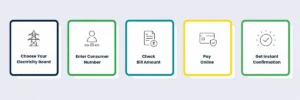
- Open your bank or payment app and go to the Bharat BillPay or “Bill Payments” tab
- Select “Electricity” as the category, then pick your specific electricity board from the list
- Enter your consumer number or account ID this is usually printed on your last physical bill
- The app pulls your current due amount automatically
- Confirm the amount and pay via UPI, card, wallet, or net banking
- You’ll get an instant confirmation on screen, plus an SMS or app receipt
The whole thing takes under two minutes once you know your consumer number, which is honestly the only step people get stuck on.
Paying Through UPI Apps Directly
If your electricity board isn’t showing up under BBPS, most major UPI apps still let you pay bills the old-fashioned way. Search for your provider by name inside the app. Enter your account number. Then pay through your linked bank account. PhonePe and Google Pay both support this for the larger electricity boards. Paytm also lets you set up auto-pay, so you don’t have to remember the due date every month.
What to Do If Your Payment Fails
Online electricity bill payment usually goes through instantly, but when it doesn’t, it’s almost always one of three things: the app pulled outdated due-amount data, your bank’s server timed out mid-transaction, or you entered the wrong consumer number. Before retrying, check your bank statement first. If the money was deducted but the bill still shows unpaid, it usually reflects within 24 hours. If it doesn’t, we’d suggest using the app’s dedicated bill-payment complaint section rather than a general support line; it tends to get resolved faster.
Online electricity bill payment solves the how. It doesn’t do anything about the amount itself, which keeps climbing as tariffs rise. If you’re a renter or live in an apartment without roof access for solar panels, we built SundayGrids to close that gap: you reserve solar capacity remotely, and the credits generated apply straight to your electricity bill, so the number you’re paying online every month is actually smaller to begin with.
Conclusion
Online electricity bill payment isn’t complicated once you know where to look. BBPS covers most electricity boards through a single “B” icon inside your existing banking or payment app, and UPI apps fill the gap for the rest. Keep your consumer number handy, double-check the due amount before confirming, and you’re done in under two minutes. And if you’re tired of the bill itself being too high no matter how fast you pay it, that’s exactly the problem we started SundayGrids to solve.